L2 Extension over EVPN supporting IEEE standard 802.3 and 802.1Q documentation!
L2VPN - EVPN is a interconnect that utilizes the MP-BGP and MPLS backbone to connect two or more Datacentre without the traditional flood and learn variant of MPLS (VPLS).
EVPN Multipoint Solution
EVPN is the next generation of multipoint L2VPN solution that aligns operation principles of L3VPN with Ethernet services. Instead of relying solely on data plane for MAC Address learning, EVPN PE devices signal and learn MAC addresses over the core network using BGP, while still using data plane MAC-learning on the access side. Providers can configure BGP as a common VPN control plane for their ethernet offerings and leverage the advantages of Layer 3 VPN over VPLS.
EVPN Building Blocks
There are three fundamental building blocks for EVPN technology, EVPN Instance (EVI), Ethernet Segment (ES), EVPN BGP routes and extended communities:
EVI is a VPN connection on a PE router. It is the equivalent of IP VPN Routing and Forwarding (VRF) in Layer 3 VPN. It is also known as MAC-VRF.
ES is a connection with a customer site (device or network) and is associated with access-facing interfaces. Access-facing interfaces are assigned unique IDs that are referred to as Ethernet Segment Identifiers (ESI). A site can be connected to one or more PEs. The ES connection has the same ESI in each PE connected to the site.
RFC 7432 defines routes and extended communities to enable EPVN support. In Cisco IOS XE Fuji 16.8.x Software Release, Route Type 2 and Route Type 3 are supported.
In BGP MPLS-based EVPN, an EVI is configured for every PE device for each customer associated with the PE device. In this case, a customer is any customer edge device that is attached to the PE device. The CE device can be a host, a switch or a router. Each EVI has a unique Route Distinguisher (RD) and one or more Route Targets (RT).
For EVPN Single-Homing feature, a CE device is attached to a single PE device and has an Ethernet Segment with ESI=0.
To learn more about the solution please refer to the below cisco documentation. https://www.cisco.com/c/en/us/td/docs/routers/ios/config/17-x/mpls/b-mpls/m-ce-evpn-single-homing.html
LAB - Topology

Network Configuration
The network is configured as follows:
The PCs are configured with IP addresses in the 11.11.11.0/24 subnet.
- The vEDGE01 router is configured with the following interfaces:
GiagbitEthernet1(10.16.201.2/30): This interface connects to the vEDGE02 - GigabitEthernet1 - 10.16.201.1/30.
GiagbitEthernet2: This interface connects to the PC1 - eth0 via a Switch - as a Layer 2 switchport.
Loopback0(2.2.247.1/32): This interface is used to establish dynamic Routing and LISP.
Tunnel2(1.1.247.1/32): This interface is used to establis IPSec tunnel using VTI.
- The vEDGE02 router is configured with the following interfaces:
GiagbitEthernet1(10.16.201.1/30): This interface connects to the vEDGE01 - GigabitEthernet1 - 10.16.201.2/30.
GiagbitEthernet2: This interface connects to the PC2 - eth0 via a Switch - as a Layer 2 switchport.
Loopback0(2.2.247.2/32): This interface is used to establish dynamic Routing and LISP.
Tunnel2(1.1.247.2/32): This interface is used to establis IPSec tunnel using VTI.
Lab Documentation: Extending Layer2 across Datacenters using EVPN - MP-BGP!
This document describes a network lab setup with two PCs (PC1, and PC2), a vEDGE router cisco 8000v (IoS XE), IPSec Site 2 Site Tunnel using SVTI, OSPF, MPLS, MP-BGP and EVPN The lab demonstrates routing, connectivity, and L2 Extension across DC’s using IPSec Site 2 Site Tunnel using SVTI, OSPF, MPLS, MP-BGP and EVPN protocols.
Hardware and Software:
VMware Workstation
EVE-NG Community Edition
Host-only network adapters - with EVE-NG networking
NAT adpater - EVE-NG to be access through browser
cisco 8000v - IOS XE images
Linux Tiny core for PC’s
Lab Setup:
Download the VMware workstation or fusion for flavour of the operating system or if you have VMWare ESXi server then follow the below steps to provision the VM. * System Requirement * Minimum RAM: 16G * Processor: 2 * HDD: 30G
Install the VMWare software in accordance to your operating system by following the installation guide.
            https://docs.vmware.com/en/VMware-Workstation-Pro/17/com.vmware.ws.using.doc/GUID-7179281C-903A-46A9-89EE-C10B126D4960.html

.. code-block:: console

            https://www.vmware.com/pdf/desktop/fusion-getting-started-50.pdf
Download the prebuild EVE-NG lab OVF file from the Google Drive.
https://drive.google.com/file/d/18RXKkAczP_f8xt5MIGc7_f0aOM0xmcAU/view?usp=sharing
Extract or unzip the file using zip extractor or windows default zip
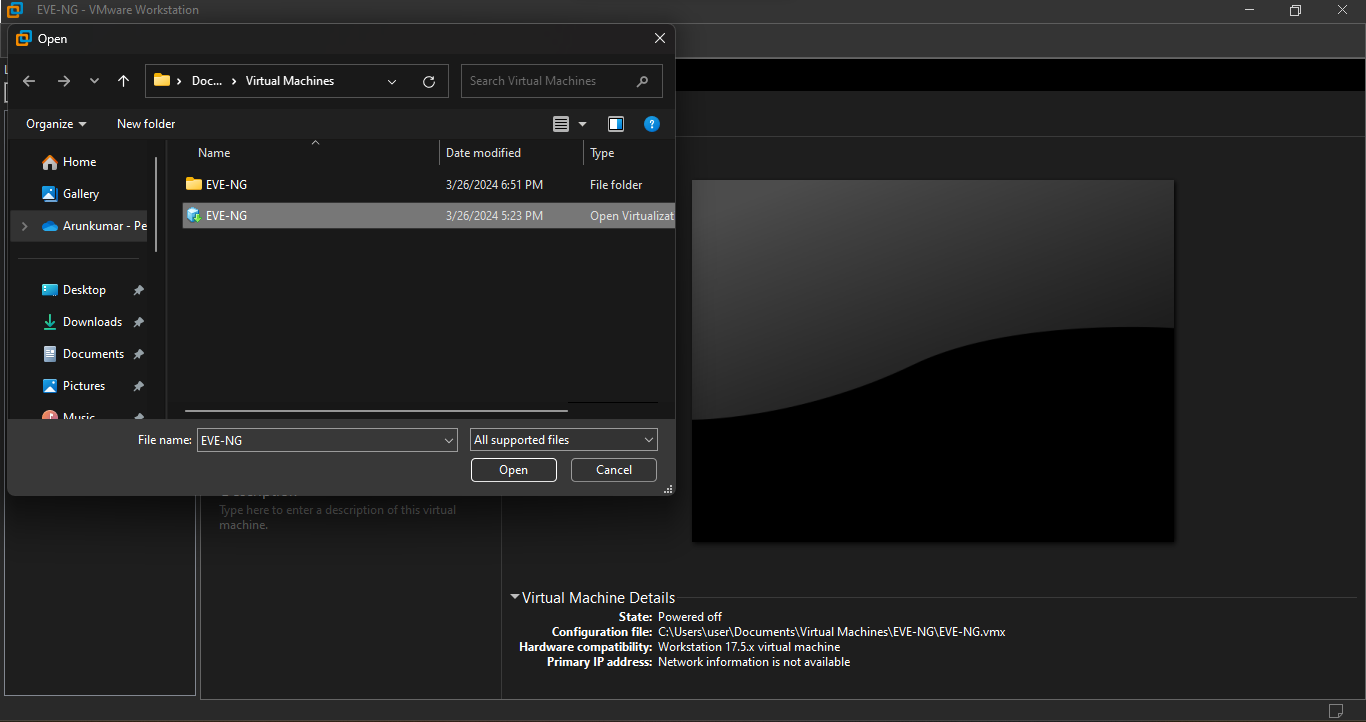
Import the OVF as below
Starting the VMWare workstation application will open a dash board as below,

Click on the file menu on the Top bar, to list the available menus,
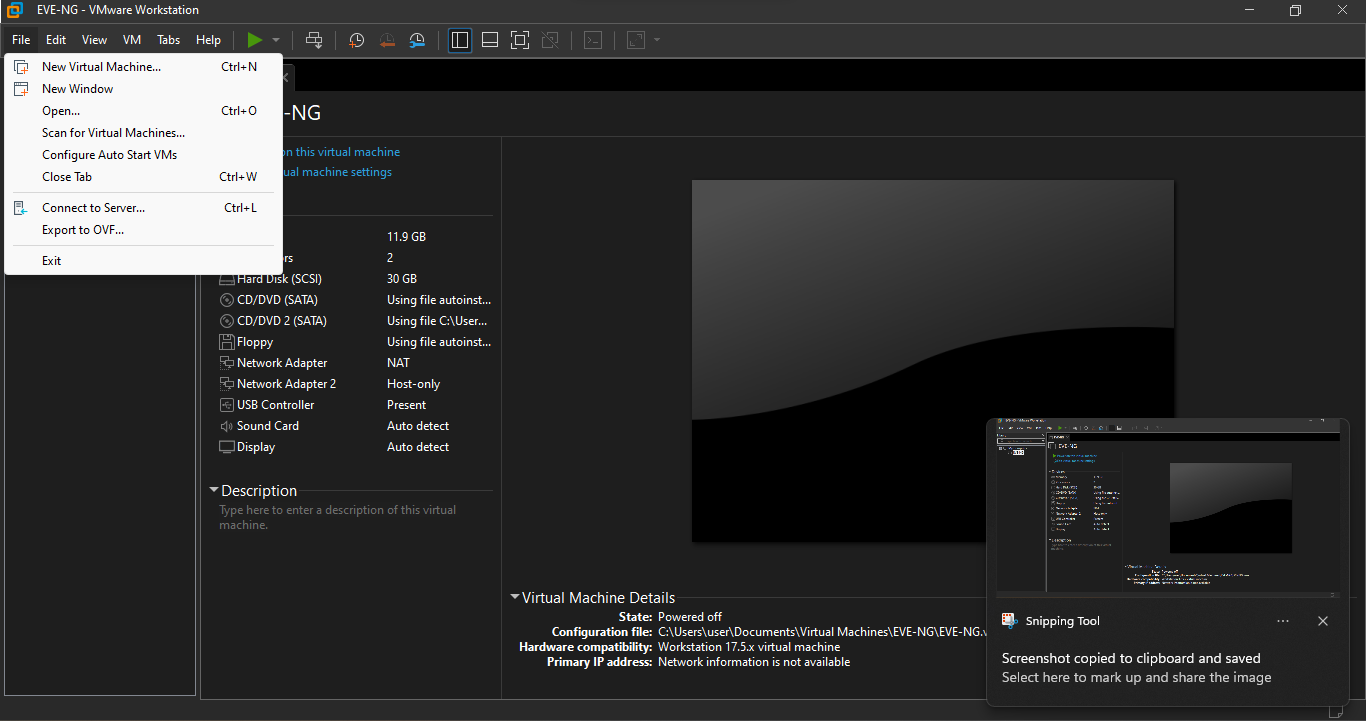
Click on the open menu on the DropDwon List, which will allow you choose the file to import, navigate to the location where you have downloaded and extracted the OVF files.
Start the Virtual Machine by click on the start button, upon successful boot the below window appears with an ip address.
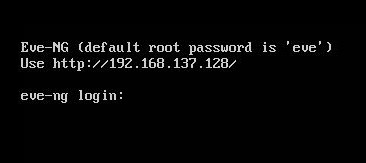
Open your faviroute and type the IP address show on the above screen to access the Admin GUI.
code ..
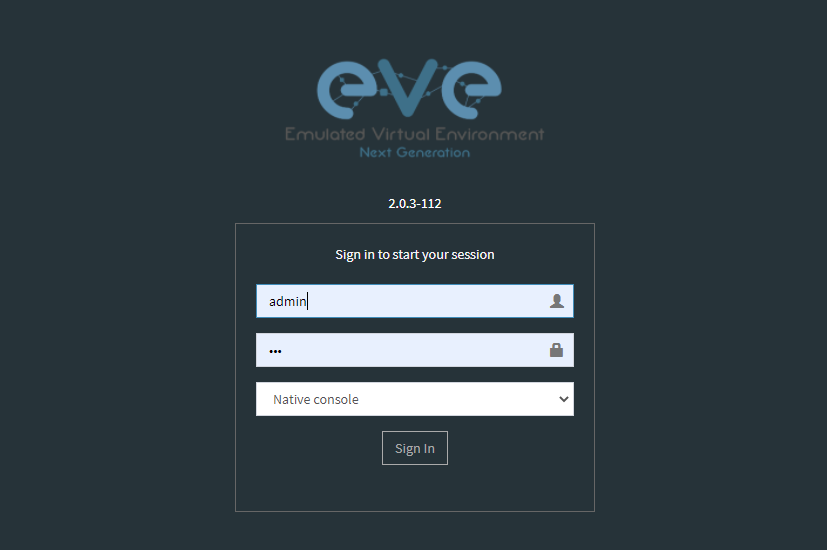
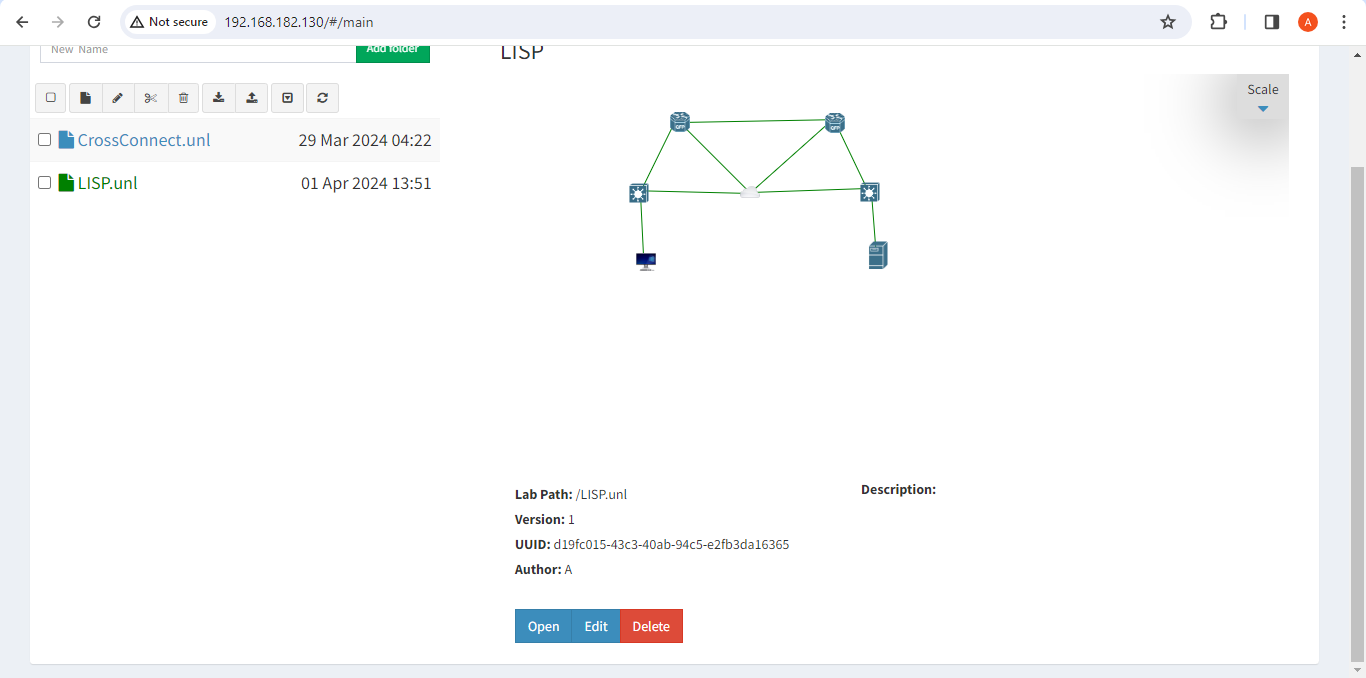
On the EVE-NG, Admin Dashboard look for LISP.unl and click on open lab.
On the Lab Right Click and select start on the vEDGE-DC01, vEDGE-DC02, PC01 and PC02 to power on the routers and pc’s.
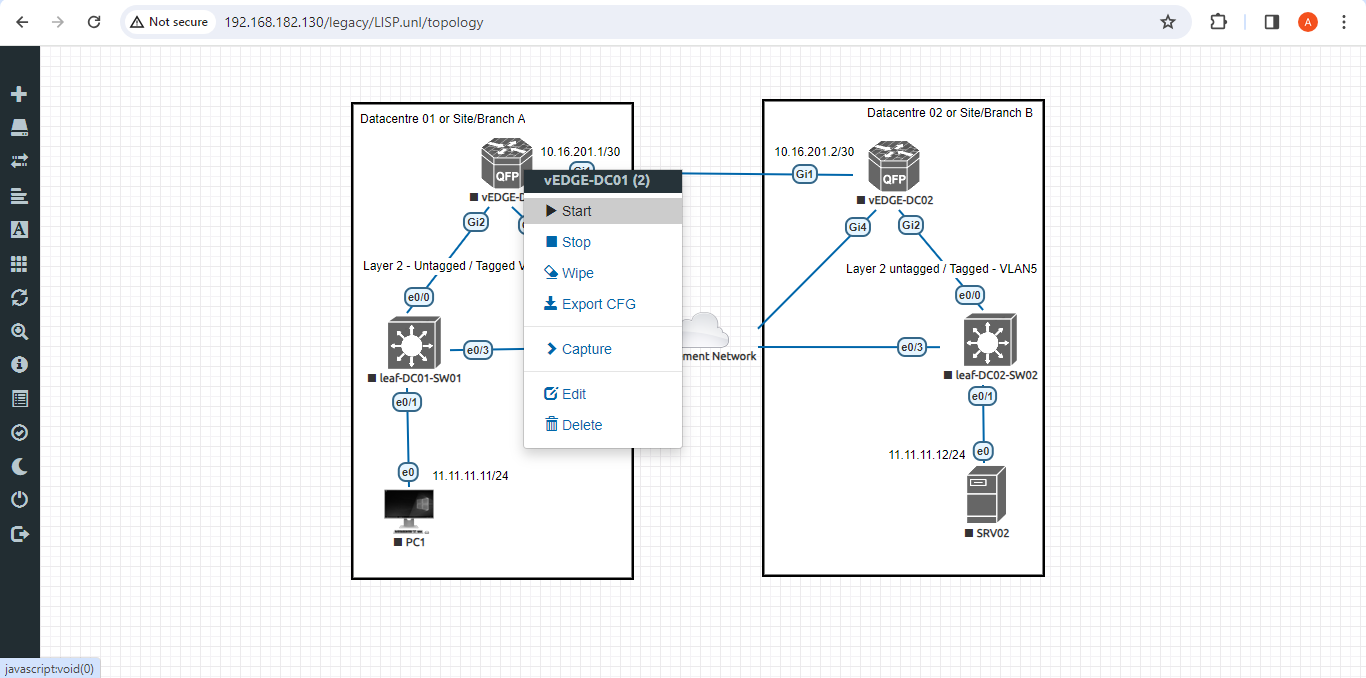
Double click on the network components such as Routers, Switches and PC’s to open HTML5 based terminal.
User credentials to access the vEDGE-DC01, vEDGE-DC02, leaf-DC01-SWW01 and leaf-DC02-SW01
username: cisco
password: P@ssw0rd!123
enable: P@ssw0rd!123
Optional: Onboarding vEDGE’s to controller
Please refer to command reference guide offered by cisco
https://www.cisco.com/c/en/us/td/docs/ios-xml/ios/prog/command/1711/b_1711_programmability_cr/1711_programmability_cr_CLT_chapter.html
https://www.cisco.com/c/en/us/td/docs/ios-xml/ios/17_xe/command/command-references.html
You can find the configuration script on the below folder
https://drive.google.com/drive/folders/1yHk81Uf2YtJQECsduuFw2xLJDC2yVNA0?usp=sharing
1. On vEDGE-DC01 and vEDGE-DC02 router
1. Enable Cisco Network Advantage and DNA Advantage license on vEDGE's and management ip address
    hostname_switch1: vEDGE-DC01-SW01
    hostname_switch1: vEDGE-DC02-SW01
    conf t
      license boot level network-advantage addon dna-advantage
      hostname <host_name>
      username cisco priv 15 password 0 P@swsw0rd!123
      service password-encryption
      crypto key generate rsa mod 2048
      aaa new-model
      aaa authentication login default local
      line vty 0 4
      transport in ssh
    exit
    interface g4
    desc "To Management Network - NAT on VMWARE"
    no shut
    ip address dhcp
    wr me

    Note: Stop and Start the vEDGE's to take effect without the above licenses you cant enable MPLS and Crypto's

    Verification
    1. show ip int bri --> take note of DHCP assigned ip address on interface G4
    2. ssh -l cisco <int_g4_ip_address>
    2. Accessing the vEDGE's from Windows Host, using putty ssh to <int_g4_ip_address>

2. Configure interface for core loopback router id
  On vEDGE-DC01
   conf t
    interface lo0
    ip add 2.2.247.2 255.255.255.255
    end
    wr me

  On vEDGE-DC02
    conf t
    interface lo0
    ip add 2.2.247.2 255.255.255.255
    end
    wr me
3. Enable MPLS & L2 VPN EVPN Globally for both vEDGE-DC01 and vEDGE-DC02
    conf t
    mpls ip
    mpls label protocol ldp
    mpls ldp router-id lo0
    l2vpn evpn
     replication-type ingress
     mpls label mode per-ce
     router-id Loopback0
    !
    end
    wr me
4. Configure IKEv2 IPSEC tunnel profile

 IKEv2 Proposal for both vEDGE-DC01 and vEDGE-
  Conf t
  !
  crypto ikev2 proposal ikev2-proposal
   encryption aes-gcm-256
   prf sha384
   group 19 20 21
  !
 IKEv2 Policyfor both vEDGE-DC01 and vEDGE-02
  crypto ikev2 policy ikev2-policy
   proposal ikev2-proposal
  !
 IKEv2 Keyring for vEDGE-DC01
  crypto ikev2 keyring ikev2-keyring
   peer p2p-vedges
    address 10.16.201.1
    pre-shared-key local cisco cisco
    pre-shared-key remote cisco cisco
   !
 IKEv2 Keyring for vEDGE-DC02
  crypto ikev2 keyring ikev2-keyring
   peer p2p-vedges
    address 10.16.201.2
    pre-shared-key local cisco cisco
    pre-shared-key remote cisco cisco
   !

 IKEv2 Profile for vEDGE-DC01 & vEDGE-DC02
  crypto ikev2 profile ikev2-profile
   match identity remote address 0.0.0.0
   authentication remote pre-share
   authentication local pre-share
   keyring local ikev2-keyring
  !
IPSec Transform-Set for vEDGE-DC01 & vEDGE-DC02
  crypto ipsec transform-set transform-set-ikev2-ipsec esp-aes 256 esp-sha512-hmac
   mode transport
  !
 IPSec Profile for vEDGE-DC01 & vEDGE-DC02
  crypto ipsec profile p2p-vedge-ipsec-profile
   set transform-set transform-set-ikev2-ipsec
   set ikev2-profile ikev2-profile
  !
  end
  wr me
5. Configure interface for core MPLS MP-BGP infra
  Interface configuration for vEDGE-DC01
    conf t
    interface g1
    no shut
    desc "To internet"
    ip address 10.16.201.2 255.255.255.0
    exit
    int tu0
    desc "GRE over IPSec via Internet (port G1)"
    no shut
    ip address 1.1.247.1 255.255.255.255
    ip mtu 1400
    ip tcp adjust-ms 1360
    mpls ip
    mpls bgp forarding
    mpls label protocol ldp
    tunnel source g1
    tunnel destination 10.16.201.1
    tunnel mode gre ip
    tunnel protection ipsec profile p2p-vedge-ipsec-profile
    ip ospf 11 area 11
    interface lo0
    ip ospf 11 area 11
    end
    we me

  Interface configuration for vEDGE-DC02
    conf t
    interface g1
    no shut
    desc "To internet"
    ip address 10.16.201.1 255.255.255.0
    exit
    int tu0
    desc "GRE over IPSec via Internet (port G1)"
    no shut
    ip address 1.1.247.2 255.255.255.255
    ip mtu 1400
    ip tcp adjust-ms 1360
    mpls ip
    mpls bgp forarding
    mpls label protocol ldp
    tunnel source g1
    tunnel destination 10.16.201.2
    tunnel mode gre ip
    tunnel protection ipsec profile p2p-vedge-ipsec-profile
    ip ospf 11 area 11
    interface lo0
    ip ospf 11 area 11
    end
    we me


    Verification
    on vEDGE-DC01

    vEDGE-DC01#sh ip int bri
    Interface              IP-Address      OK? Method Status                Protocol
    GigabitEthernet1       10.16.201.2     YES manual up                    up
    GigabitEthernet2       unassigned      YES NVRAM  up                    up
    GigabitEthernet3       unassigned      YES NVRAM  up                    up
    GigabitEthernet4       192.168.182.144 YES DHCP   up                    up
    Loopback0              2.2.247.1       YES manual up                    up
    Tunnel0                1.1.247.1       YES manual up                    up


    vEDGE-DC01#sh int desc
    Interface                      Status         Protocol Description
    Gi1                            up             up       "To Internet"
    Gi2                            up             up       "To PC01 via leaf-DC01-Sw01 port eth0/0"
    Gi3                            up             up
    Gi4                            up             up
    Lo0                            up             up
    Tu0                            up             up       "GRE over IPsec via G1"

    vEDGE-DC01#sh int tunnel 0
    Tunnel0 is up, line protocol is up
      Hardware is Tunnel
      Description: "GRE over IPsec via G1"
      Internet address is 1.1.247.1/30
      MTU 9918 bytes, BW 100 Kbit/sec, DLY 50000 usec,
         reliability 255/255, txload 5/255, rxload 5/255
      Encapsulation TUNNEL, loopback not set
      Keepalive not set
      Tunnel linestate evaluation up
      Tunnel source 10.16.201.2 (GigabitEthernet1), destination 10.16.201.1
       Tunnel Subblocks:
          src-track:
             Tunnel0 source tracking subblock associated with GigabitEthernet1
              Set of tunnels with source GigabitEthernet1, 1 member (includes iterators), on interface <OK>
      Tunnel protocol/transport GRE/IP
        Key disabled, sequencing disabled
        Checksumming of packets disabled
      Tunnel TTL 255, Fast tunneling enabled
      Tunnel transport MTU 1418 bytes
      Tunnel transmit bandwidth 8000 (kbps)
      Tunnel receive bandwidth 8000 (kbps)
      Tunnel protection via IPSec (profile "p2p-vedge-ipsec-profile")
      Last input 00:00:03, output 00:00:02, output hang never
      Last clearing of "show interface" counters 03:22:13
      Input queue: 0/375/0/0 (size/max/drops/flushes); Total output drops: 0
      Queueing strategy: fifo
      Output queue: 0/0 (size/max)
      5 minute input rate 2000 bits/sec, 2 packets/sec
      5 minute output rate 2000 bits/sec, 2 packets/sec
         11790 packets input, 1368759 bytes, 0 no buffer
         Received 0 broadcasts (0 IP multicasts)
         0 runts, 0 giants, 0 throttles
         0 input errors, 0 CRC, 0 frame, 0 overrun, 0 ignored, 0 abort
         11538 packets output, 1355417 bytes, 0 underruns
         Output 0 broadcasts (0 IP multicasts)
         0 output errors, 0 collisions, 0 interface resets
         0 unknown protocol drops
         0 output buffer failures, 0 output buffers swapped out

    on vEDGE-DC02
    vEDGE-DC02#sh ip int bri
    Interface              IP-Address      OK? Method Status                Protocol
    GigabitEthernet1       10.16.201.1     YES manual up                    up
    GigabitEthernet2       unassigned      YES manual up                    up
    GigabitEthernet3       unassigned      YES NVRAM  up                    up
    GigabitEthernet4       192.168.182.143 YES DHCP   up                    up
    Loopback0              2.2.247.2       YES manual up                    up
    Tunnel0                1.1.247.2       YES manual up                    up
    vEDGE-DC02#sh int desc
    Interface                      Status         Protocol Description
    Gi1                            up             up       "To Internet"
    Gi2                            up             up
    Gi3                            up             up
    Gi4                            up             up
    Lo0                            up             up       "For iBGP, LDP, and EVPN core"
    Tu0                            up             up       "GRE over IPSec via G1"

    vEDGE-DC02#sh int t0
    Tunnel0 is up, line protocol is up
      Hardware is Tunnel
      Description: "GRE over IPSec via G1"
      Internet address is 1.1.247.2/30
      MTU 9918 bytes, BW 100 Kbit/sec, DLY 50000 usec,
         reliability 255/255, txload 5/255, rxload 5/255
      Encapsulation TUNNEL, loopback not set
      Keepalive not set
      Tunnel linestate evaluation up
      Tunnel source 10.16.201.1 (GigabitEthernet1), destination 10.16.201.2
       Tunnel Subblocks:
          src-track:
             Tunnel0 source tracking subblock associated with GigabitEthernet1
              Set of tunnels with source GigabitEthernet1, 1 member (includes iterat                                                                                                                ors), on interface <OK>
      Tunnel protocol/transport GRE/IP
        Key disabled, sequencing disabled
        Checksumming of packets disabled
      Tunnel TTL 255, Fast tunneling enabled
      Tunnel transport MTU 1418 bytes
      Tunnel transmit bandwidth 8000 (kbps)
      Tunnel receive bandwidth 8000 (kbps)
      Tunnel protection via IPSec (profile "p2p-vedge-ipsec-profile")
      Last input 00:00:03, output 00:00:00, output hang never
      Last clearing of "show interface" counters 02:47:28
      Input queue: 0/375/0/0 (size/max/drops/flushes); Total output drops: 0
      Queueing strategy: fifo
      Output queue: 0/0 (size/max)
      5 minute input rate 2000 bits/sec, 2 packets/sec
      5 minute output rate 2000 bits/sec, 2 packets/sec
         15237 packets input, 1812615 bytes, 0 no buffer
         Received 0 broadcasts (0 IP multicasts)
         0 runts, 0 giants, 0 throttles
         0 input errors, 0 CRC, 0 frame, 0 overrun, 0 ignored, 0 abort
         15547 packets output, 1830169 bytes, 0 underruns
         Output 0 broadcasts (0 IP multicasts)
         0 output errors, 0 collisions, 0 interface resets
         0 unknown protocol drops
         0 output buffer failures, 0 output buffers swapped out


    L3 Connectivity Test
    P2P on vEDGE-DC01

      vEDGE-DC01#ping 10.16.201.1
      Type escape sequence to abort.
      Sending 5, 100-byte ICMP Echos to 10.16.201.1, timeout is 2 seconds:
      !!!!!
      Success rate is 100 percent (5/5), round-trip min/avg/max = 1/1/3 ms

    Lo0 to Lo0 via OSPF and GRE over IPSEC

      vEDGE-DC01#ping 2.2.247.2 source 2.2.247.1
      Type escape sequence to abort.
      Sending 5, 100-byte ICMP Echos to 2.2.247.2, timeout is 2 seconds:
      Packet sent with a source address of 2.2.247.1
      !!!!!
      Success rate is 100 percent (5/5), round-trip min/avg/max = 2/2/3 ms

    P2P on vEDGE-DC01

      vEDGE-DC02#ping 10.16.201.2
      Type escape sequence to abort.
      Sending 5, 100-byte ICMP Echos to 10.16.201.2, timeout is 2 seconds:
      !!!!!
      Success rate is 100 percent (5/5), round-trip min/avg/max = 1/4/16 ms

    Lo0 to Lo0 via OSPF and GRE over IPSEC

      vEDGE-DC02#ping 2.2.247.1 source 2.2.247.2
      Type escape sequence to abort.
      Sending 5, 100-byte ICMP Echos to 2.2.247.1, timeout is 2 seconds:
      Packet sent with a source address of 2.2.247.2
      !!!!!
      Success rate is 100 percent (5/5), round-trip min/avg/max = 1/1/2 ms
6. Configure IGP - OSPF for route exchange
OSPF Configuration on vEDGE-DC01

  conf t
  router ospf 11
  router-id 1.1.247.1
  end
  wr me

OSPF Configuration on vEDGE-DC02

  conf t
  router ospf 11
  router-id 1.1.247.2
  end
  wr me

Verification - OSPF and Route table on vEDGE-DC01

  vEDGE-DC01#sh ip ospf nei
  Neighbor ID     Pri   State           Dead Time   Address         Interface
  1.1.247.2         0   FULL/  -        00:00:38    1.1.247.2       Tunnel0
  vEDGE-DC01#sh ip ospf database

              OSPF Router with ID (1.1.247.1) (Process ID 11)

                  Router Link States (Area 11)

  Link ID         ADV Router      Age         Seq#       Checksum Link count
  1.1.247.1       1.1.247.1       1935        0x8000000A 0x002F23 3
  1.1.247.2       1.1.247.2       18          0x80000009 0x002F21 3


  vEDGE-DC01#sh ip route
  Codes: L - local, C - connected, S - static, R - RIP, M - mobile, B - BGP
         D - EIGRP, EX - EIGRP external, O - OSPF, IA - OSPF inter area
         N1 - OSPF NSSA external type 1, N2 - OSPF NSSA external type 2
         E1 - OSPF external type 1, E2 - OSPF external type 2, m - OMP
         n - NAT, Ni - NAT inside, No - NAT outside, Nd - NAT DIA
         i - IS-IS, su - IS-IS summary, L1 - IS-IS level-1, L2 - IS-IS level-2
         ia - IS-IS inter area, * - candidate default, U - per-user static route
         H - NHRP, G - NHRP registered, g - NHRP registration summary
         o - ODR, P - periodic downloaded static route, l - LISP
         a - application route
         + - replicated route, % - next hop override, p - overrides from PfR
         & - replicated local route overrides by connected

  Gateway of last resort is 192.168.182.2 to network 0.0.0.0

  S*    0.0.0.0/0 [254/0] via 192.168.182.2
        1.0.0.0/8 is variably subnetted, 2 subnets, 2 masks
  C        1.1.247.0/30 is directly connected, Tunnel0
  L        1.1.247.1/32 is directly connected, Tunnel0
        2.0.0.0/32 is subnetted, 2 subnets
  C        2.2.247.1 is directly connected, Loopback0
  O        2.2.247.2 [110/1001] via 1.1.247.2, 02:14:52, Tunnel0
        10.0.0.0/8 is variably subnetted, 2 subnets, 2 masks
  C        10.16.201.0/30 is directly connected, GigabitEthernet1
  L        10.16.201.2/32 is directly connected, GigabitEthernet1
        192.168.182.0/24 is variably subnetted, 2 subnets, 2 masks
  C        192.168.182.0/24 is directly connected, GigabitEthernet4
  L        192.168.182.144/32 is directly connected, GigabitEthernet4

Verification of MPLS and LDP establishment

  vEDGE-DC01#sh mpls interfaces
  Interface              IP            Tunnel   BGP Static Operational
  Tunnel0                Yes (ldp)     No       Yes No     Yes


  vEDGE-DC01#show mpls forwarding-table
  Local      Outgoing   Prefix           Bytes Label   Outgoing   Next Hop
  Label      Label      or Tunnel Id     Switched      interface
  16         Pop Label  2.2.247.2/32     0             Tu0        point2point
  17         No Label   evpn(mc:bd 1015) 3402          none       point2point
  18         No Label   evpn(uc:bd 1015) 0             none       point2point
  19         No Label   evpn(uc:ifh 0x8, efp 1015)   \
                                         861798        none       point2point

  vEDGE-DC01#sh mpls ldp bindings
    lib entry: 0.0.0.0/0, rev 2
          local binding:  label: imp-null
          remote binding: lsr: 192.168.182.143:0, label: imp-null
    lib entry: 1.1.247.0/30, rev 4
          local binding:  label: imp-null
          remote binding: lsr: 192.168.182.143:0, label: imp-null
    lib entry: 2.2.247.1/32, rev 6
          local binding:  label: imp-null
          remote binding: lsr: 192.168.182.143:0, label: 16
    lib entry: 2.2.247.2/32, rev 12
          local binding:  label: 16
          remote binding: lsr: 192.168.182.143:0, label: imp-null
    lib entry: 10.16.201.0/30, rev 8
          local binding:  label: imp-null
          remote binding: lsr: 192.168.182.143:0, label: imp-null
    lib entry: 192.168.182.0/24, rev 10
          local binding:  label: imp-null
          remote binding: lsr: 192.168.182.143:0, label: imp-null

  vEDGE-DC01#sh mpls ldp discovery
   Local LDP Identifier:
      2.2.247.1:0
      Discovery Sources:
      Interfaces:
          Tunnel0 (ldp): xmit/recv
              LDP Id: 192.168.182.143:0


Verification - OSPF and Route table on vEDGE-DC02

  vEDGE-DC02#sh ip ospf nei

  Neighbor ID     Pri   State           Dead Time   Address         Interface
  1.1.247.1         0   FULL/  -        00:00:37    1.1.247.1       Tunnel0
  vEDGE-DC02#sh ip ospf database

              OSPF Router with ID (1.1.247.2) (Process ID 11)

                  Router Link States (Area 11)

  Link ID         ADV Router      Age         Seq#       Checksum Link count
  1.1.247.1       1.1.247.1       1688        0x8000000B 0x002D24 3
  1.1.247.2       1.1.247.2       1783        0x80000009 0x002F21 3

  vEDGE-DC02#sh ip route
  Codes: L - local, C - connected, S - static, R - RIP, M - mobile, B - BGP
         D - EIGRP, EX - EIGRP external, O - OSPF, IA - OSPF inter area
         N1 - OSPF NSSA external type 1, N2 - OSPF NSSA external type 2
         E1 - OSPF external type 1, E2 - OSPF external type 2, m - OMP
         n - NAT, Ni - NAT inside, No - NAT outside, Nd - NAT DIA
         i - IS-IS, su - IS-IS summary, L1 - IS-IS level-1, L2 - IS-IS level-2
         ia - IS-IS inter area, * - candidate default, U - per-user static route
         H - NHRP, G - NHRP registered, g - NHRP registration summary
         o - ODR, P - periodic downloaded static route, l - LISP
         a - application route
         + - replicated route, % - next hop override, p - overrides from PfR
         & - replicated local route overrides by connected

  Gateway of last resort is 192.168.182.2 to network 0.0.0.0

  S*    0.0.0.0/0 [254/0] via 192.168.182.2
        1.0.0.0/8 is variably subnetted, 2 subnets, 2 masks
  C        1.1.247.0/30 is directly connected, Tunnel0
  L        1.1.247.2/32 is directly connected, Tunnel0
        2.0.0.0/32 is subnetted, 2 subnets
  O        2.2.247.1 [110/1001] via 1.1.247.1, 02:44:16, Tunnel0
  C        2.2.247.2 is directly connected, Loopback0
        10.0.0.0/8 is variably subnetted, 2 subnets, 2 masks
  C        10.16.201.0/30 is directly connected, GigabitEthernet1
  L        10.16.201.1/32 is directly connected, GigabitEthernet1
        192.168.182.0/24 is variably subnetted, 2 subnets, 2 masks
  C        192.168.182.0/24 is directly connected, GigabitEthernet4
  L        192.168.182.143/32 is directly connected, GigabitEthernet4


  vEDGE-DC02#sh mpls int
  Interface              IP            Tunnel   BGP Static Operational
  Tunnel0                Yes (ldp)     No       Yes No     Yes
  vEDGE-DC02#sh mpls ldp discovery
   Local LDP Identifier:
      192.168.182.143:0
      Discovery Sources:
      Interfaces:
          Tunnel0 (ldp): xmit/recv
              LDP Id: 2.2.247.1:0
  vEDGE-DC02#sh mpls ldp binding
    lib entry: 0.0.0.0/0, rev 2
          local binding:  label: imp-null
          remote binding: lsr: 2.2.247.1:0, label: imp-null
    lib entry: 1.1.247.0/30, rev 4
          local binding:  label: imp-null
          remote binding: lsr: 2.2.247.1:0, label: imp-null
    lib entry: 2.2.247.1/32, rev 10
          local binding:  label: 16
          remote binding: lsr: 2.2.247.1:0, label: imp-null
    lib entry: 2.2.247.2/32, rev 12
          local binding:  label: imp-null
          remote binding: lsr: 2.2.247.1:0, label: 16
    lib entry: 10.16.201.0/30, rev 6
          local binding:  label: imp-null
          remote binding: lsr: 2.2.247.1:0, label: imp-null
    lib entry: 192.168.182.0/24, rev 8
          local binding:  label: imp-null
          remote binding: lsr: 2.2.247.1:0, label: imp-null

  vEDGE-DC02#sh mpls forwarding
  Local      Outgoing   Prefix           Bytes Label   Outgoing   Next Hop
  Label      Label      or Tunnel Id     Switched      interface
  16         Pop Label  2.2.247.1/32     0             Tu0        point2point
  17         No Label   evpn(mc:bd 1015) 13836         none       point2point
  18         No Label   evpn(uc:bd 1015) 0             none       point2point
  19         No Label   evpn(uc:ifh 0x8, efp 1015)   \
                                         1162762       none       point2point
7. Configure MP - BGP for EVPN
MP_BGP for vEDGE-DC01

  conf t
  router bgp 65000
   bgp router-id 2.2.247.1
   bgp log-neighbor-changes
   no bgp default ipv4-unicast
   neighbor 2.2.247.2 remote-as 65000
   neighbor 2.2.247.2 update-source Loopback0
   !
   address-family ipv4
   exit-address-family
   !
   address-family l2vpn evpn
    neighbor 2.2.247.2 activate
    neighbor 2.2.247.2 send-community both
    neighbor 2.2.247.2 soft-reconfiguration inbound
   exit-address-family
  !
  end
  wr me

MP_BGP for vEDGE-DC01

  conf t
  router bgp 65000
   bgp router-id 2.2.247.2
   bgp log-neighbor-changes
   no bgp default ipv4-unicast
   neighbor 2.2.247.1 remote-as 65000
   neighbor 2.2.247.1 update-source Loopback0
   !
   address-family ipv4
   exit-address-family
   !
   address-family l2vpn evpn
    neighbor 2.2.247.1 activate
    neighbor 2.2.247.1 send-community both
    neighbor 2.2.247.1 soft-reconfiguration inbound
   exit-address-family
  !
  end
  wr me

Verify the BGP establishment on either vEDGE-DC01 or vEDGE-DC02

  vEDGE-DC01#show bgp l2vpn evpn summary
  BGP router identifier 2.2.247.1, local AS number 65000
  BGP table version is 41, main routing table version 41
  6 network entries using 2304 bytes of memory
  6 path entries using 1392 bytes of memory
  4/4 BGP path/bestpath attribute entries using 1184 bytes of memory
  1 BGP extended community entries using 24 bytes of memory
  0 BGP route-map cache entries using 0 bytes of memory
  0 BGP filter-list cache entries using 0 bytes of memory
  BGP using 4904 total bytes of memory
  BGP activity 14/8 prefixes, 18/12 paths, scan interval 60 secs
  7 networks peaked at 09:48:22 Apr 1 2024 UTC (01:17:05.028 ago)

  Neighbor        V           AS MsgRcvd MsgSent   TblVer  InQ OutQ Up/Down  State/PfxRcd
  2.2.247.2       4        65000     172     166       41    0    0 02:15:52        3


Verify the BGP establishment on either vEDGE-DC01 or vEDGE-DC02

  vEDGE-DC02# show bgp l2vpn evpn summary
  BGP router identifier 2.2.247.2, local AS number 65000
  BGP table version is 39, main routing table version 39
  6 network entries using 2304 bytes of memory
  6 path entries using 1392 bytes of memory
  4/4 BGP path/bestpath attribute entries using 1184 bytes of memory
  1 BGP extended community entries using 24 bytes of memory
  0 BGP route-map cache entries using 0 bytes of memory
  0 BGP filter-list cache entries using 0 bytes of memory
  BGP using 4904 total bytes of memory
  BGP activity 14/8 prefixes, 18/12 paths, scan interval 60 secs
  7 networks peaked at 09:48:22 Apr 1 2024 UTC (01:46:07.624 ago)

  Neighbor        V           AS MsgRcvd MsgSent   TblVer  InQ OutQ Up/Down  State/PfxRcd
  2.2.247.1       4        65000     198     205       39    0    0 02:44:55        3
8. Configre L2VPN service instance for Customer A
L2VPN service instance for both vEDGE-DC01 and vEDGE-DC02

  conf t
  l2vpn evpn instance 1015 vlan-aware
   rd 11.11.11.0:1015
   route-target export 65000:1015
   route-target import 65000:1015
   no auto-route-target
  end
  wr me

on vEDGE-DC01

  vEDGE-DC01#show l2vpn evpn evi detail
  EVPN instance:       1015 (VLAN Aware)
    RD:                11.11.11.0:1015 (cfg)
    Import-RTs:        65000:1015
    Export-RTs:        65000:1015
    Per-EVI Label:     none
    State:             Established
    Replication Type:  Ingress (global)
    Encapsulation:     mpls
    IP Local Learn:    Enabled (global)
    Adv. Def. Gateway: Disabled (global)
    Bridge Domain:     1015
      Ethernet-Tag:    5
      BUM Label:       17
      Per-BD Label:    none
      BDI Label:       18
      State:           Established
      Flood Suppress:  Attached
      Access If:
      VRF:
      IPv4 IRB:        Disabled
      IPv6 IRB:        Disabled
      Pseudoports (Labels):
        GigabitEthernet2 service instance 1015 (19)
          Routes: 1 MAC, 1 MAC/IP
      Peers:
        2.2.247.2
          Routes: 1 MAC, 1 MAC/IP, 1 IMET, 0 EAD


on vEDGE-DC02

  vEDGE-DC02#show l2vpn evpn evi detail
  EVPN instance:       1015 (VLAN Aware)
    RD:                11.11.11.0:1015 (cfg)
    Import-RTs:        65000:1015
    Export-RTs:        65000:1015
    Per-EVI Label:     none
    State:             Established
    Replication Type:  Ingress (global)
    Encapsulation:     mpls
    IP Local Learn:    Enabled (global)
    Adv. Def. Gateway: Disabled (global)
    Bridge Domain:     1015
      Ethernet-Tag:    5
      BUM Label:       17
      Per-BD Label:    none
      BDI Label:       18
      State:           Established
      Flood Suppress:  Attached
      Access If:
      VRF:
      IPv4 IRB:        Disabled
      IPv6 IRB:        Disabled
      Pseudoports (Labels):
        GigabitEthernet2 service instance 1015 (19)
          Routes: 1 MAC, 1 MAC/IP
      Peers:
        2.2.247.1
          Routes: 1 MAC, 1 MAC/IP, 1 IMET, 0 EAD
9. Configure bridge domain for Customer A
Bridge Domain for both vEDGE-DC01 and vEDGE-DC02

  conf t
  bridge-domain 1015
   mac aging-time 30
   member GigabitEthernet2 service-instance 1015
   member evpn-instance 1015 ethernet-tag 5
  !
  end
  wr me

on vEDGE-DC01

  vEDGE-DC01#show bridge-domain 1015 evpn
  Bridge-domain 1015 (2 ports in all)
  State: UP                    Mac learning: Enabled
  Aging-Timer: 30 second(s)
  Unknown Unicast Flooding Suppression: Disabled
  Maximum address limit: 65536
      GigabitEthernet2 service instance 1015
      EVPN Instance 1015
     AED MAC address    Policy  Tag       Age  Pseudoport
     -----------------------------------------------------------------------------
     -   0050.0000.0400 forward dynamic_c 30   GigabitEthernet2.EFP1015
     -   0050.0000.0600 forward static_r  0    EFI1015.1015.4210704, EVPN


on vEDGE-DC02

  vEDGE-DC02#show bridge-domain 1015 evpn
  Bridge-domain 1015 (2 ports in all)
  State: UP                    Mac learning: Enabled
  Aging-Timer: 30 second(s)
  Unknown Unicast Flooding Suppression: Disabled
  Maximum address limit: 65536
      GigabitEthernet2 service instance 1015
      EVPN Instance 1015
     AED MAC address    Policy  Tag       Age  Pseudoport
     -----------------------------------------------------------------------------
     -   0050.0000.0400 forward static_r  0    EFI1015.1015.4210704, EVPN
     -   0050.0000.0600 forward dynamic_c 29   GigabitEthernet2.EFP1015
10. Configure Customer facing interface for Customer A
Customer facing interfaces for both vEDGE-DC01 and vEDGE-DC02
for untagged

  interface GigabitEthernet2
   description "To PC01 via leaf-DC01-Sw01 port eth0/0"
   no ip address
   negotiation auto
   no mop enabled
   no mop sysid
   service instance 1015 ethernet
    encapsulation untagged
   !
  !
  end
  wr me

for tagged - 802.1q

  interface GigabitEthernet2
   description "To PC01 via leaf-DC01-Sw01 port eth0/0"
   no ip address
   negotiation auto
   no mop enabled
   no mop sysid
   service instance 1015 ethernet
    encapsulation dot1q 5
   !
  !
  end
  wr me


Verification
on vEDGE-DC01
  vEDGE-DC01#show ip bgp l2vpn evpn route-type 2
  BGP routing table entry for [2][11.11.11.0:1015][5][48][005000000400][0][*]/20, version 36
  Paths: (1 available, best #1, table evi_1015)
    Advertised to update-groups:
       1
    Refresh Epoch 1
    Local
      :: (via default) from 0.0.0.0 (2.2.247.1)
        Origin incomplete, localpref 100, weight 32768, valid, sourced, local, best
        EVPN ESI: 00000000000000000000, Label1 19
        Extended Community: RT:65000:1015
        rx pathid: 0, tx pathid: 0x0
        Updated on Apr 1 2024 10:39:29 UTC
  BGP routing table entry for [2][11.11.11.0:1015][5][48][005000000400][32][11.11.11.11]/24, version 37
  Paths: (1 available, best #1, table evi_1015)
    Advertised to update-groups:
       1
    Refresh Epoch 1
    Local
      :: (via default) from 0.0.0.0 (2.2.247.1)
        Origin incomplete, localpref 100, weight 32768, valid, sourced, local, best
        EVPN ESI: 00000000000000000000, Label1 19
        Extended Community: RT:65000:1015
        rx pathid: 0, tx pathid: 0x0
        Updated on Apr 1 2024 10:39:29 UTC
  BGP routing table entry for [2][11.11.11.0:1015][5][48][005000000600][0][*]/20, version 40
  Paths: (1 available, best #1, table evi_1015)
    Not advertised to any peer
    Refresh Epoch 8
    Local, (received & used)
      2.2.247.2 (metric 1001) (via default) from 2.2.247.2 (2.2.247.2)
        Origin incomplete, metric 0, localpref 100, valid, internal, best
        EVPN ESI: 00000000000000000000, Label1 19
        Extended Community: RT:65000:1015
        rx pathid: 0, tx pathid: 0x0
        Updated on Apr 1 2024 10:39:30 UTC
  BGP routing table entry for [2][11.11.11.0:1015][5][48][005000000600][32][11.11.11.12]/24, version 41
  Paths: (1 available, best #1, table evi_1015)
    Not advertised to any peer
    Refresh Epoch 8
    Local, (received & used)
      2.2.247.2 (metric 1001) (via default) from 2.2.247.2 (2.2.247.2)
        Origin incomplete, metric 0, localpref 100, valid, internal, best
        EVPN ESI: 00000000000000000000, Label1 19
        Extended Community: RT:65000:1015
        rx pathid: 0, tx pathid: 0x0
        Updated on Apr 1 2024 10:39:30 UTC


  vEDGE-DC01#show ip bgp l2vpn evpn route-type 3
  BGP routing table entry for [3][11.11.11.0:1015][5][32][2.2.247.1]/17, version 2
  Paths: (1 available, best #1, table evi_1015)
    Advertised to update-groups:
       1
    Refresh Epoch 1
    Local
      :: (via default) from 0.0.0.0 (2.2.247.1)
        Origin incomplete, localpref 100, weight 32768, valid, sourced, local, best
        Extended Community: RT:65000:1015
        PMSI Attribute: Flags:0x0, Tunnel type:IR, length 4, label:17, tunnel identifier: 0000 0000
        rx pathid: 0, tx pathid: 0x0
        Updated on Apr 1 2024 09:21:01 UTC
  BGP routing table entry for [3][11.11.11.0:1015][5][32][2.2.247.2]/17, version 8
  Paths: (1 available, best #1, table evi_1015)
    Not advertised to any peer
    Refresh Epoch 8
    Local, (received & used)
      2.2.247.2 (metric 1001) (via default) from 2.2.247.2 (2.2.247.2)
        Origin incomplete, metric 0, localpref 100, valid, internal, best
        Extended Community: RT:65000:1015
        PMSI Attribute: Flags:0x0, Tunnel type:IR, length 4, label:17, tunnel identifier: < Tunnel Endpoint: 2.2.247.2 >
        rx pathid: 0, tx pathid: 0x0
        Updated on Apr 1 2024 09:42:11 UTC

  vEDGE-DC01#show bridge-domain 1015 evpn
  Bridge-domain 1015 (2 ports in all)
  State: UP                    Mac learning: Enabled
  Aging-Timer: 30 second(s)
  Unknown Unicast Flooding Suppression: Disabled
  Maximum address limit: 65536
      GigabitEthernet2 service instance 1015
      EVPN Instance 1015
     AED MAC address    Policy  Tag       Age  Pseudoport
     -----------------------------------------------------------------------------
     -   0050.0000.0400 forward dynamic_c 30   GigabitEthernet2.EFP1015
     -   0050.0000.0600 forward static_r  0    EFI1015.1015.4210704, EVPN


 On vEDGE-DC02
  vEDGE-DC02#$ l2vpn evpn route-type 2
  BGP routing table entry for [2][11.11.11.0:1015][5][48][005000000400][0][*]/20, version 36
  Paths: (1 available, best #1, table evi_1015)
    Not advertised to any peer
    Refresh Epoch 3
    Local, (received & used)
      2.2.247.1 (metric 1001) (via default) from 2.2.247.1 (2.2.247.1)
        Origin incomplete, metric 0, localpref 100, valid, internal, best
        EVPN ESI: 00000000000000000000, Label1 19
        Extended Community: RT:65000:1015
        rx pathid: 0, tx pathid: 0x0
        Updated on Apr 1 2024 10:39:29 UTC
  BGP routing table entry for [2][11.11.11.0:1015][5][48][005000000400][32][11.11.11.11]/24, version 37
  Paths: (1 available, best #1, table evi_1015)
    Not advertised to any peer
    Refresh Epoch 3
    Local, (received & used)
      2.2.247.1 (metric 1001) (via default) from 2.2.247.1 (2.2.247.1)
        Origin incomplete, metric 0, localpref 100, valid, internal, best
        EVPN ESI: 00000000000000000000, Label1 19
        Extended Community: RT:65000:1015
        rx pathid: 0, tx pathid: 0x0
        Updated on Apr 1 2024 10:39:29 UTC
  BGP routing table entry for [2][11.11.11.0:1015][5][48][005000000600][0][*]/20, version 38
  Paths: (1 available, best #1, table evi_1015)
    Advertised to update-groups:
       1
    Refresh Epoch 1
    Local
      :: (via default) from 0.0.0.0 (2.2.247.2)
        Origin incomplete, localpref 100, weight 32768, valid, sourced, local, best
        EVPN ESI: 00000000000000000000, Label1 19
        Extended Community: RT:65000:1015
        rx pathid: 0, tx pathid: 0x0
        Updated on Apr 1 2024 10:39:30 UTC
  BGP routing table entry for [2][11.11.11.0:1015][5][48][005000000600][32][11.11.11.12]/24, version 39
  Paths: (1 available, best #1, table evi_1015)
    Advertised to update-groups:
       1
    Refresh Epoch 1
    Local
      :: (via default) from 0.0.0.0 (2.2.247.2)
        Origin incomplete, localpref 100, weight 32768, valid, sourced, local, best
        EVPN ESI: 00000000000000000000, Label1 19
        Extended Community: RT:65000:1015
        rx pathid: 0, tx pathid: 0x0
        Updated on Apr 1 2024 10:39:30 UTC
  vEDGE-DC02#show ip bgp l2vpn evpn route-type 3
  BGP routing table entry for [3][11.11.11.0:1015][5][32][2.2.247.1]/17, version 5
  Paths: (1 available, best #1, table evi_1015)
    Flag: 0x100
    Not advertised to any peer
    Refresh Epoch 3
    Local, (received & used)
      2.2.247.1 (metric 1001) (via default) from 2.2.247.1 (2.2.247.1)
        Origin incomplete, metric 0, localpref 100, valid, internal, best
        Extended Community: RT:65000:1015
        PMSI Attribute: Flags:0x0, Tunnel type:IR, length 4, label:17, tunnel identifier: < Tunnel Endpoint: 2.2.247.1 >
        rx pathid: 0, tx pathid: 0x0
        Updated on Apr 1 2024 09:22:06 UTC
  BGP routing table entry for [3][11.11.11.0:1015][5][32][2.2.247.2]/17, version 8
  Paths: (1 available, best #1, table evi_1015)
    Advertised to update-groups:
       1
    Refresh Epoch 1
    Local
      :: (via default) from 0.0.0.0 (2.2.247.2)
        Origin incomplete, localpref 100, weight 32768, valid, sourced, local, best
        Extended Community: RT:65000:1015
        PMSI Attribute: Flags:0x0, Tunnel type:IR, length 4, label:17, tunnel identifier: 0000 0000
        rx pathid: 0, tx pathid: 0x0
        Updated on Apr 1 2024 09:42:11 UTC

  vEDGE-DC02#show bridge-domain 1015 evpn
  Bridge-domain 1015 (2 ports in all)
  State: UP                    Mac learning: Enabled
  Aging-Timer: 30 second(s)
  Unknown Unicast Flooding Suppression: Disabled
  Maximum address limit: 65536
      GigabitEthernet2 service instance 1015
      EVPN Instance 1015
     AED MAC address    Policy  Tag       Age  Pseudoport
     -----------------------------------------------------------------------------
     -   0050.0000.0400 forward static_r  0    EFI1015.1015.4210704, EVPN
     -   0050.0000.0600 forward dynamic_c 29   GigabitEthernet2.EFP1015
2. On DC01-SW01 and DC02-SW01
2. On pc1
Step1: On the TinyCore Desktop

Step2: Click on the maintenance icon at the bottom dock
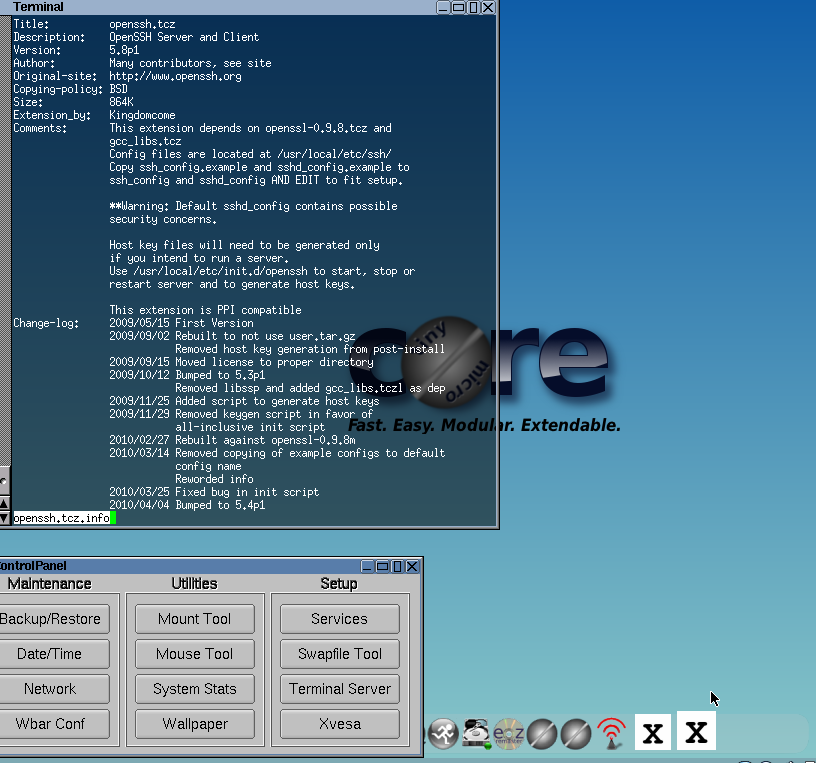
Step3: Click on the nework to configure the below ip, netmask and gateway
IP address: 11.11.11.11
Subnet Mask: 255.255.255.0
Gateway: 11.11.11.12
4. On pc2
Step1: On the TinyCore Desktop
Step2: Click on the maintenance icon at the bottom dock
Step3: Click on the nework to configure the below ip, netmask and gateway
IP address: 11.11.11.12
Subnet Mask: 255.255.255.0
Gateway: 11.11.11.11
5. End to End Testing
On PC01
1. Open terminal and issue the following command
    a. ip a --> to confirm the assigned ip address on the eth0
    b. ip route show --> to confirm the default gateway
    b. ping 11.11.11.12 --> to confirm the end to end connectivity is there
On PC02
1. Open terminal and issue the following command
    a. ip a --> to confirm the assigned ip address on the eth0
    b. ip route show --> to confirm the default gateway
    b. ping 11.11.11.12 --> to confirm the end to end connectivity is there
6. SSH into Devices
Step1: After successfull boot up double click the device to get HTML5 based console access, enter the user cresentials to login to the execute mode, execute ‘show ip int bri’ to find the DHCP assigned IP address

Step2: Open SSH client and SSH to the dynamic IP address to login to the device locally from windows host. in this example
vEDGE-DC01: 192.168.182.144
vEDGE-DC02: 192.168.182.143
DC01-SW01: 192.168.182.145
DC02-SW01: 192.168.182.146